Fusion Experience (Beta)2.3.7353M
Publisher Description
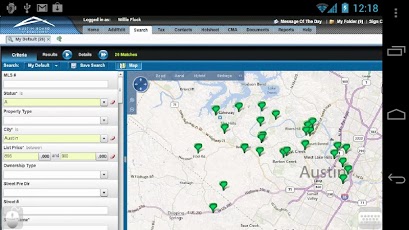
Fusion Experience (Beta) uses the power of cloud computing to give you access to the full version of the Fusion ML system by MarketLinx on your Android devices. Note that Fusion Experience can only be used by real estate agents, brokers and other affiliated professionals that already have an active ML subscription with a valid user name and password.Fusion is a fast, fun, and easy ML application that emphasizes multi-tasking, agent/client collaboration, and system personalization. Fusion offers many exciting and innovative features, including:- Multi-tasking: the ability to edit multiple listings, run multiple searches, etc.- Three-way integration between Search Results, Mapping and Images- Informative map overlays and points of interest- Demographic content and charts- Auto-generated Quick CMA- Email/home page notifications triggered by website activity- And much more!Fusion Experience works best with WiFi or high-speed mobile connections, and provides support for mouse-centric controls such as hover effects and dragging and dropping.
About Fusion Experience (Beta)
The company that develops Fusion Experience (Beta) is CloudMosa Inc.. The latest version released by its developer is 2.3.7353M. This app was rated by 1 users of our site and has an average rating of 5.0.
To install Fusion Experience (Beta) on your Android device, just click the green Continue To App button above to start the installation process. The app is listed on our website since 2013-03-26 and was downloaded 27 times. We have already checked if the download link is safe, however for your own protection we recommend that you scan the downloaded app with your antivirus. Your antivirus may detect the Fusion Experience (Beta) as malware as malware if the download link to com.cloudmosa.coreLogicFusion is broken.
How to install Fusion Experience (Beta) on your Android device:
- Click on the Continue To App button on our website. This will redirect you to Google Play.
- Once the Fusion Experience (Beta) is shown in the Google Play listing of your Android device, you can start its download and installation. Tap on the Install button located below the search bar and to the right of the app icon.
- A pop-up window with the permissions required by Fusion Experience (Beta) will be shown. Click on Accept to continue the process.
- Fusion Experience (Beta) will be downloaded onto your device, displaying a progress. Once the download completes, the installation will start and you'll get a notification after the installation is finished.
Program Details
System requirements
Download information
Pricing
Version History
version 2.3.7353M
posted on 2013-03-26
version 2.3.7353M
posted on 2013-03-26
Several fixes and updates
